Tiered caching: the checkbox that cuts origin load and almost nobody checks
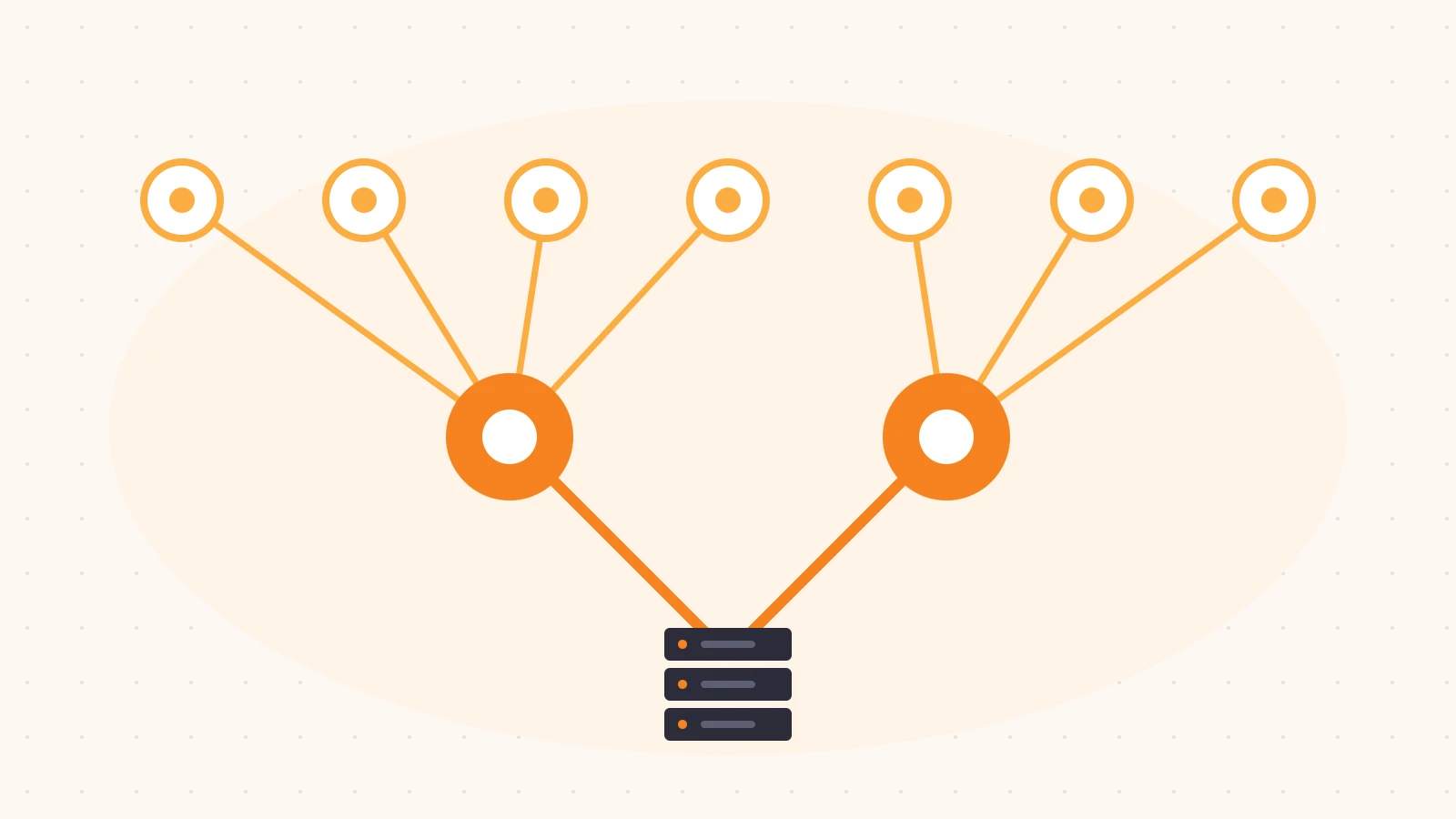
When we think about a CDN, we usually picture one layer: lots of edge locations close to users, and an origin somewhere behind them. A request comes in, the nearest edge checks its cache, and on a miss it goes to the origin.
That model has a cost that’s easy to overlook. Every edge location has its own cache. If you have content that’s requested from many places, each location misses independently and each one asks your origin for the same object. The more global your audience, the more your origin pays for it.
Tiered caching is the fix for this, and on many plans it’s a setting rather than a project. It’s also one of the settings that nobody revisits after the initial setup. In this post we’ll explain what it does, when it helps and when it doesn’t, and how to check whether it’s actually enabled for your traffic.
The problem: every edge misses on its own
Imagine an image on your homepage. It’s cached with a one-day lifetime. Users around the world load the page, and each edge location that serves them has to fetch the image once per day.
If your traffic is served by dozens of edge locations, that’s dozens of origin fetches per object per cache lifetime. Multiply that by every asset, every page, and every purge, and a large share of your origin traffic turns out to be the same content requested again by different parts of the same CDN.
It gets worse right after a deploy or a cache purge. Every location goes cold at once, and they all ask the origin at the same time. That spike is often what actually sizes your origin infrastructure.
What tiered caching does
Tiered caching adds a layer between the edge and your origin. Instead of each edge location going straight to the origin on a miss, it first asks an upper-tier cache. Only if the upper tier also misses does the request reach your origin.
Without tiers:   edge (miss) ---------------------------> origin

With tiers:      edge (miss) --> upper tier (hit)         [origin not contacted]
                 edge (miss) --> upper tier (miss) -----> origin
The upper tier is shared by many edge locations. Once it has an object, every edge behind it can fill from there. The result is that your origin sees roughly one fetch per object per upper tier, instead of one per edge location.
Different providers call this different things: tiered caching, an origin shield, a regional or mid-tier cache. The details vary, but the idea is the same.
When it helps (and when it doesn’t)
Tiered caching is most useful when:
- Your audience is geographically spread out. More edge locations serving your traffic means more duplicate misses to collapse.
- Your content is cacheable but long-tail. Objects that are requested often enough to be worth caching, but not so often that every edge keeps them warm, benefit the most.
- Your origin is expensive or fragile. If origin egress costs money, or if the origin struggles with bursts after a purge, reducing the number of fetchers matters.
- Your origin is in one region. A well-placed upper tier near your origin can also shorten the long-haul part of each miss.
It helps less, or not at all, when:
- Content isn’t cacheable. Tiers only help with responses that can be cached. Personalized pages, API calls with no caching, and requests that bypass the cache go straight through regardless. (If your hit ratio is low for those reasons, fix that first. We covered that in Your CDN cache hit ratio is lying to you.)
- Your audience is concentrated in one area. If one or two edge locations serve most of your traffic, there are fewer duplicate misses to save.
- The upper tier is badly placed. A tier far from both your users and your origin can add latency to misses. Some setups let you choose the tier topology, and the right choice depends on where your origin lives.
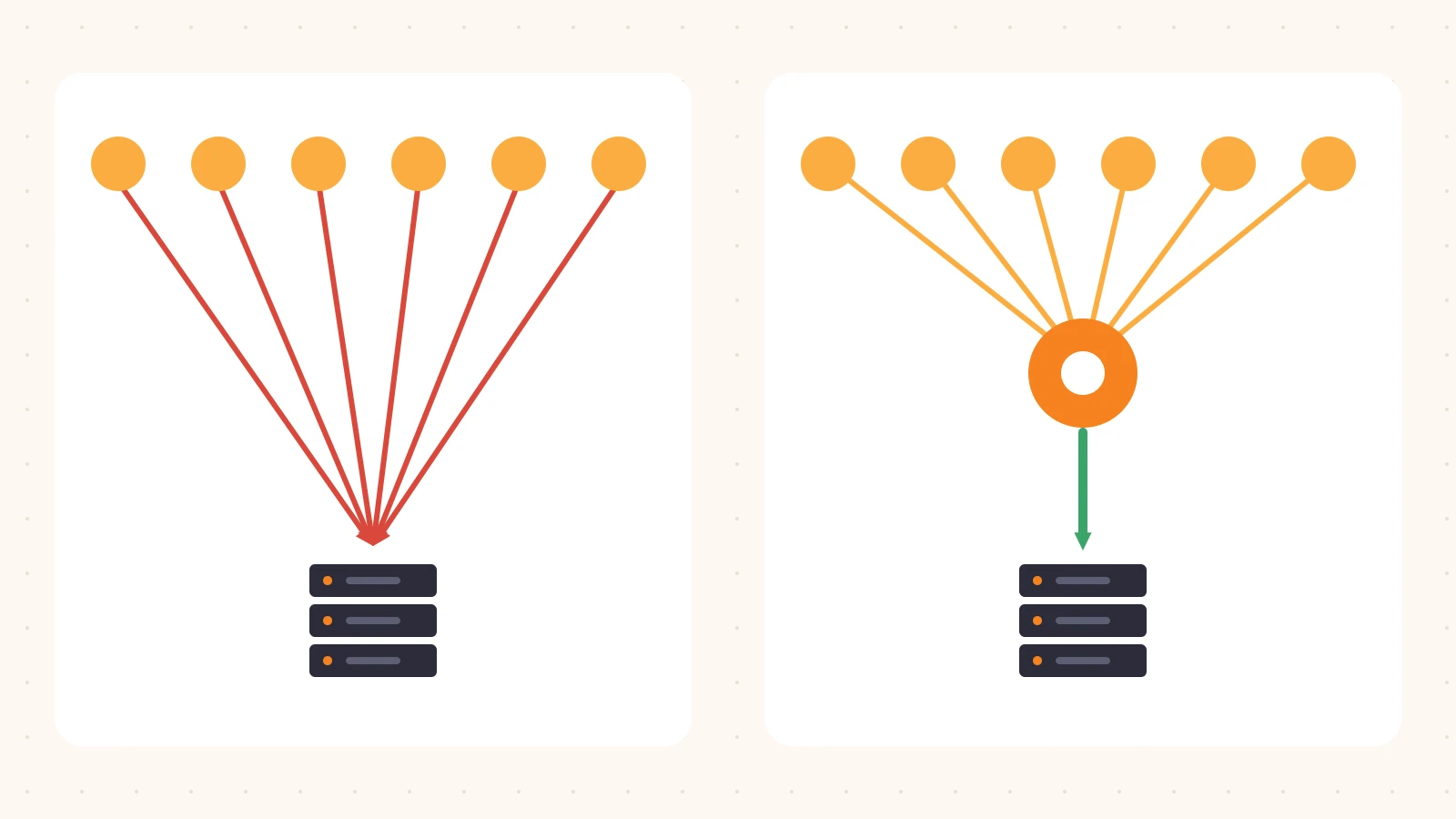
When the conditions above apply, the difference looks like this. Without tiers (left), every edge location is its own client of your origin. With them (right), your origin sees a handful of well-behaved clients that each ask once. The next step is confirming which side of this picture you are on.
How to check whether yours is on
This takes a few minutes and read-only access.
1. Look at the setting
Find the tiered caching (or origin shield) setting for each property and note whether it’s enabled and which topology it uses. Check every property that serves real traffic, not just the main one. It’s common for one property to have been configured carefully and the rest left at their defaults.
2. Compare edge misses to origin requests
If tiers are working, your origin should receive noticeably fewer requests than the total number of edge cache misses. Pull both numbers for the same time window:
edge cache misses (all locations):   A
requests received at origin via CDN: B
If B is close to A, either tiering is off or the misses are for content that isn’t cacheable.
3. Inspect response headers
Many CDNs expose cache status in response headers, and some indicate whether a response was served by an upper tier. Request the same object from a couple of different locations (for example, through a VPN or a remote machine) after a purge:
curl -sI "https://www.example.com/static/hero.jpg" | grep -iE "cache|age|via"If the second location gets a response with a non-zero Age even though it was its first request, it likely filled from an upper tier rather than from your origin.
4. Watch a purge
The cleanest test is to watch origin traffic right after a deploy or purge. With tiering, the spike should be smaller and shorter, because a limited number of upper-tier caches refill instead of every edge location at once.
Rolling it out safely
Tiered caching is usually low-risk, but it’s still a change to how traffic reaches your origin:
- Check origin allowlists. If your origin only accepts traffic from specific CDN IP ranges, make sure the upper-tier locations are included.
- Enable on one property first. Compare origin requests and miss latency for a few days before enabling it everywhere.
- Choose the topology deliberately. If you have a choice, pick tiers close to your origin’s region.
- Keep measuring origin load. Origin requests per second and origin bytes are the metrics that show whether it’s working.
Closing thoughts
Tiered caching is one of the rare settings where a single change can meaningfully reduce origin load without touching application code. It’s also easy to forget, because nothing breaks when it’s off. Your origin just works harder than it needs to.
At Plimie we’re building read-only reviews that check whether features like this are actually enabled and doing their job across all of your properties. Our pilot is free and invite-only, and you can request a free review.